I’ve been doing SEO for more than a decade. In that time I’ve built, grown, and rescued a lot of websites — everything from a brand-new local business to sites pulling 900,000+ visits a month.
This is the actual checklist I use. Not a theoretical one. It’s the same order of operations I run on my own projects and on client sites, day in and day out.
Most SEO checklists are the opposite of that. They’re 200 items long, written to look thorough, and half the points are the same copy-paste advice every agency repeats without ever having done the work. You open one, get through five items, and quietly close the tab.
Mine’s different in one way that matters: it’s ranked by impact. A handful of things drive almost all of your rankings. The rest is polish. So you’ll know exactly what to do first, how to do each part with mostly free tools, and what to realistically expect once you start — whether your site is brand new or five years old.
Fair warning: it’s less exciting than the internet makes SEO sound. But it’s the exact process that took one of my own new domains to 233 ranked keywords and AI citations inside eight months — on nothing fancy. Let’s get into it.
Key Takeaways
- What it is: An SEO checklist is a prioritised list of the actions that make your website easier for Google (and now AI) to find, understand, trust, and rank — grouped into setup, keywords, content, on-page, technical, local, and links.
- Do these five first: Search Console setup, keyword research tied to real intent, genuinely useful content, clean on-page basics, and a Google Business Profile if you’re local. That’s roughly 80% of the result.
- Free beats fancy: You can tick off most of this list with Google’s own free tools. You don’t need a $200/month subscription to rank.
- Local businesses have their own list: For a plumber in Hamilton or a café in Auckland, the map pack matters more than blog rankings — and it has extra steps.
- AI search is part of SEO now, not a separate thing: The same fundamentals that rank you on Google are what get you cited in ChatGPT and AI Overviews.
- It takes months, not days: Expect little visible movement for the first 8–12 weeks, real traction by month 3–6. Quitting early is the most common mistake.
What Is an SEO Checklist?
An SEO checklist is a list of the specific tasks that help your website rank higher on Google — organised so you actually do them in a sensible order instead of guessing.
Think of it as the difference between “I should do some SEO” and “I need to set up Search Console, then find my keywords, then write the page.” One is a vague intention. The other is a plan you can actually work through.
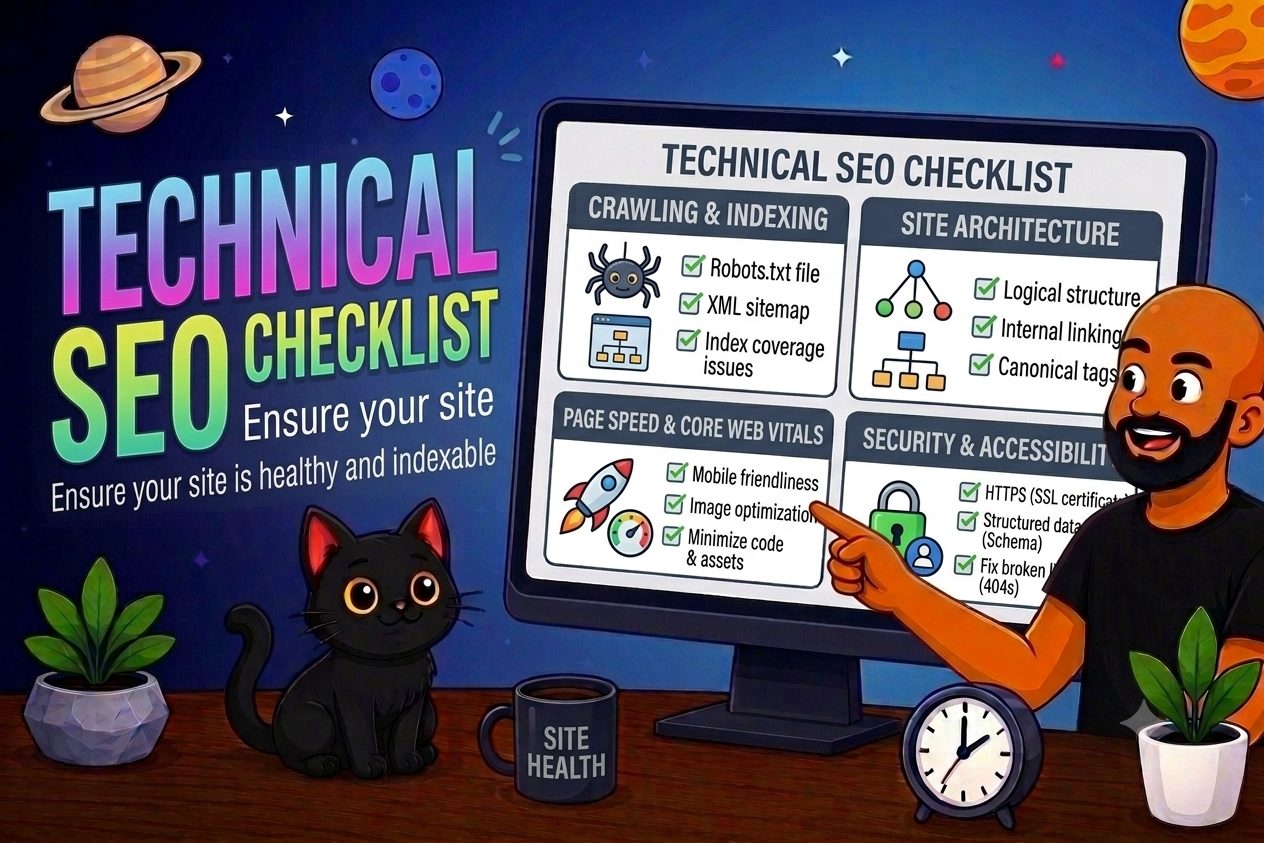
A good checklist covers the four types of SEO working together:
- On-page SEO — the stuff on your actual page (titles, headings, content).
- Technical SEO — the stuff behind the scenes (speed, crawlability, indexing).
- Content — the pages themselves, matching what people search for.
- Off-page SEO — mostly links from other websites, which act like votes of trust.
Local businesses add a fifth layer on top: local SEO, which is how you show up in the map pack for searches like “electrician near me.”
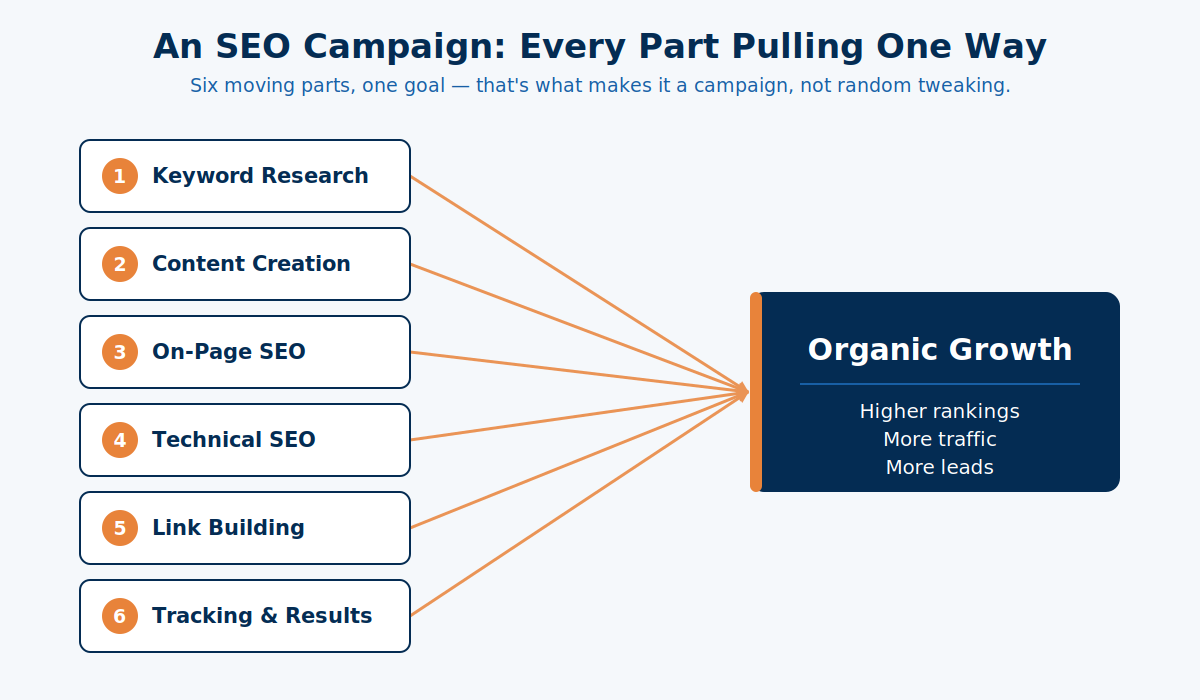
The reason it works as a checklist is simple. SEO isn’t one big lever you pull. It’s a lot of small correct decisions stacked on top of each other. Miss the basics and the clever stuff never gets a chance to matter.
Why You Need an SEO Checklist
Most sites don’t fail at SEO because the owner did something wrong. They fail because the owner did things in a random order, skipped the boring basics, and gave up before any of it compounded.
Here’s what “no system” actually looks like in the wild. A business publishes a few pages. Adds a blog post when they remember. Changes the homepage title because a mate said to. Buys ten cheap backlinks off the internet. Six months later, nothing’s moved, and they’ve decided “SEO doesn’t work.”
It wasn’t SEO. It was doing SEO without a checklist.
A checklist fixes three things at once. It stops you skipping the high-impact basics. It stops you wasting weeks on things that don’t move the needle. And it turns a pile of random tactics into something that actually compounds.
And the payoff is worth it, because SEO has the best economics in marketing when it’s done properly. The average return on SEO sits around 748% once it matures — and an organic lead costs a fraction of a paid one (about $31 versus $181 in one large industry study). The catch is in that phrase: done properly. The checklist is what “properly” looks like.

And no, SEO is not dead in 2026 — it just now includes getting found in AI answers too. More on that further down.
How to Use This Checklist: The 20% That Drives 80%
If you only do five things from this entire list, do these five. They’re where almost all the movement comes from for a typical New Zealand business:
- Set up Google Search Console so you can actually see what’s happening.
- Do proper keyword research so you target things people search and you can rank for.
- Write genuinely useful content that fully answers the search.
- Nail the on-page basics — title, headings, internal links.
- Set up your Google Business Profile if you serve a local area.
Everything else on this list is real and worth doing. But those five are the engine. The rest is tuning.
Throughout the checklist, I’ve tagged each item so you know where to spend your energy:
- High impact — do it, it moves rankings.
- Medium — do it once the high-impact items are done.
- Nice-to-have — worth it eventually, not urgent.
One more filter: new site vs existing site. If your website is brand new, start at Setup and work down in order. If you’ve got an existing site that’s just not ranking, start with keyword research and content — that’s usually where the problem is hiding.
I know the order works because I’ve run it on my own site. Expert SEO is a new domain, up against NZ agencies with a decade’s head start. By doing the high-impact items first — not all 200 at once — it hit 233 ranked keywords and got cited in Google’s AI answers inside about eight months.

Why does the order matter so much? Because effort is wasted at the bottom of the search results. The top three organic spots take the lion’s share of the clicks — position 10 gets almost nothing. Polishing a page’s schema when it’s stuck on page four is rearranging deck chairs. Get it to page one first. That’s what the top five do.
If you’d rather not run this yourself, it’s also exactly the work we handle through our SEO services — but everything here is DIY-able, so let’s keep going.
Setup & Tracking Checklist (Do This Once)
Before you optimise a single page, get your foundations in place. This is a one-time setup you never repeat, and it’s what lets you see whether everything else is working. (High impact — do it first.)
Set up Google Search Console. This is the single most important free tool in SEO. It shows you what you rank for, what’s getting clicks, and whether Google can even index your pages.
Here’s how: go to Search Console, add your site as a “Domain” property, then verify it by copying the TXT record Google gives you into your domain’s DNS settings (in your registrar — think GoDaddy, Cloudflare, or wherever you bought the domain). Paste it in, hit verify, done.
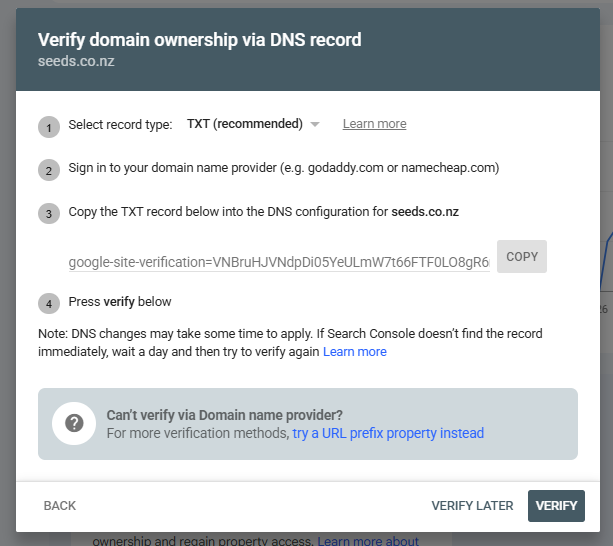
The benefit is that you stop guessing. You can see whether your pages are indexed, whether traffic is growing, and whether Google has flagged issues to fix.
Set up Google Analytics 4. Search Console tells you how people find you. Analytics tells you what they do once they’re on the site. Both are free. Create a property, drop the tracking code (or the GA4 tag) into your site’s header, and confirm it’s firing.
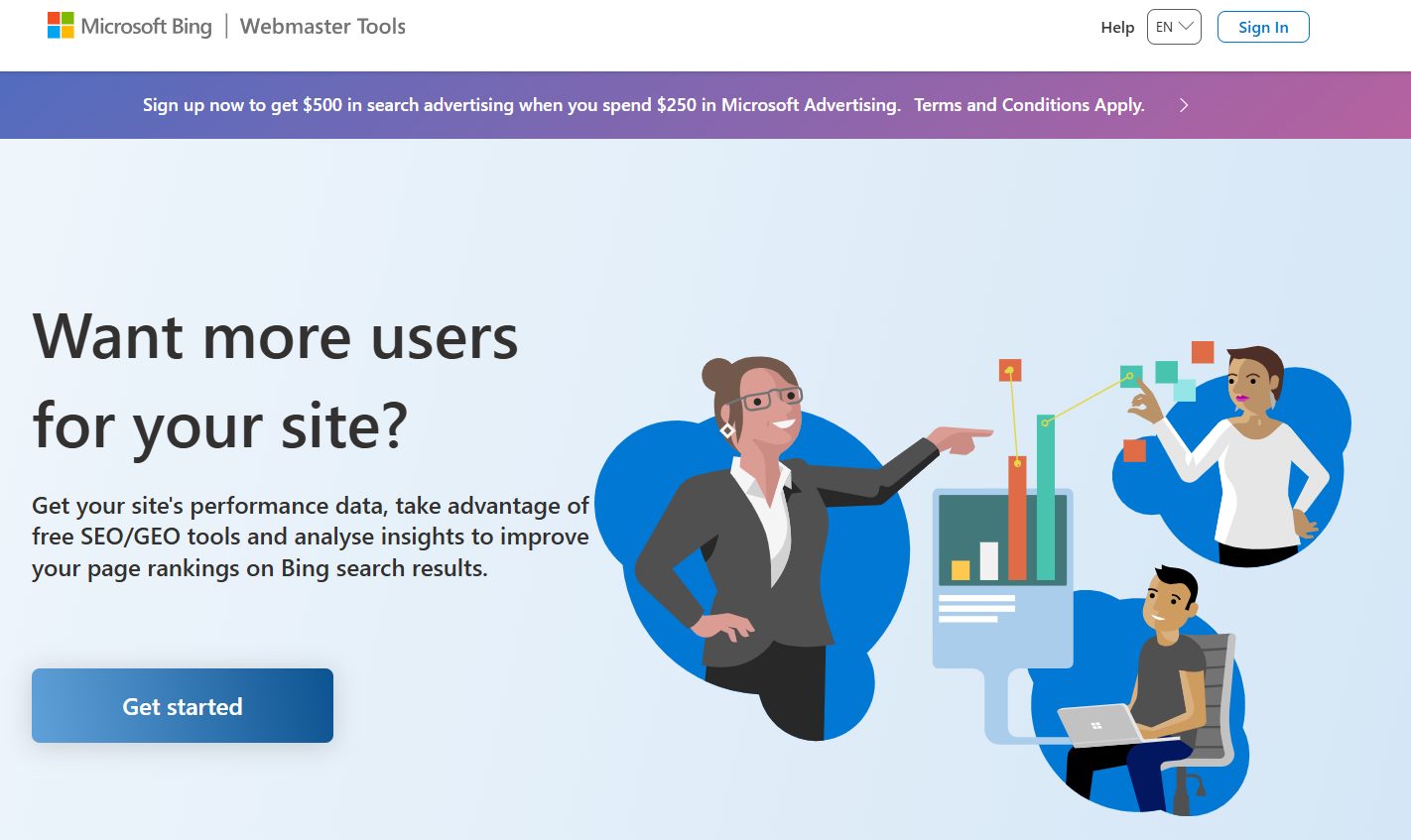
Set up Bing Webmaster Tools. Two minutes, and it matters more than it used to — because ChatGPT’s search runs on Bing’s index. You can even import your site straight from Search Console.
Submit an XML sitemap. This is a map of your pages that tells Google what exists. If you’re on WordPress, an SEO plugin like Rank Math or Yoast generates one automatically at yoursite.co.nz/sitemap.xml. Grab that URL and submit it in Search Console under “Sitemaps.”
Check your robots.txt. This little file tells search engines what they can and can’t crawl. The main thing here is a don’t: make sure you’re not accidentally blocking your whole site (a stray Disallow: / will quietly keep you out of Google entirely). It happens more than you’d think, usually after a site launch.
Confirm HTTPS is on. Your site should load with the padlock, on https://. Nearly every NZ host includes a free SSL certificate now, so this is usually just a checkbox — but check it’s actually enforced, so the non-secure version of your site redirects properly.
Tick these off and you’ve got a dashboard for everything that follows. Now the real work starts.
Keyword Research Checklist
Keyword research is the process of finding what people actually type into Google, so you can build pages that match that demand. Skip it and you’re optimising for words nobody searches. (High impact.)
Here’s the process I use:
Brainstorm your services × locations. Start with what you sell and where. A panel beater in Tauranga isn’t chasing “automotive services” — they want “panel beater Tauranga,” “car dent repair Tauranga,” “bumper repair Mount Maunganui.” Real words, real places.
Expand the list with free tools. Type your main keyword into Google and read the autocomplete suggestions. Scroll to “People also ask” and “Related searches” at the bottom. Every one of those is a real query. For volume, open Google Keyword Planner (free with a Google Ads account) and set the location to New Zealand — this is the step everyone gets wrong.

Watch the global-vs-NZ volume trap. This is the one that burns people. “SEO checklist” shows about 57,000 global searches a month — but only around 210 of those are in New Zealand. If you chase the global number, you’ll wildly overestimate your traffic. Always filter to NZ. (And treat Keyword Planner’s numbers as rough — Ahrefs has found it overestimates volume most of the time; it’s a direction, not gospel.)
Match each keyword to search intent. This decides what kind of page you build. “How does panel beating work” is informational — that’s a blog post. “Panel beater Hamilton quote” is commercial — that’s a service page. Informational keywords build authority. Commercial keywords bring the money. You need both, on the right page types.
Don’t ignore long-tail. Longer, specific searches like “affordable family dentist east Auckland” convert far better than “dentist,” and they’re easier to rank for. They’re not a small niche, either — long-tail queries make up the overwhelming majority of all searches. Chase a stack of these before you fight for the one-word giants.
Free tools that help: Google autocomplete, “People also ask,” Keyword Planner, and even Trade Me’s search bar if you sell products. ChatGPT is handy for generating 20 seed keywords to start from — just verify the volumes in a real tool afterward.
Do this properly and every page you build after this has a job. That’s the whole game.
Content Checklist
Content is where SEO is won or lost. You can nail every technical box and still go nowhere if the page doesn’t actually answer the search better than what’s already ranking. (High impact.)
Match the intent, exactly. Before writing, Google your target keyword and look at what’s ranking. All how-to guides? Google wants a guide, not a sales page. All product pages? Don’t publish a blog post. Fighting the intent is the fastest way to not rank.
Cover the topic completely. The page that wins is usually the one that answers every follow-up question, not the one with the most words. In fact Google has said outright there’s no ideal word count — a 700-word page that fully answers the query beats a padded 3,000-word one. Cover what the reader actually needs, then stop.
Show real experience (E-E-A-T). Google’s helpful-content systems reward content that reads like it was written by someone who’s actually done the thing. Real examples, real numbers, real opinions. Its 2024 core update wiped out a huge amount of thin, generic content for exactly this reason — so genuine expertise is a ranking asset now, not a nice-to-have.
Structure it to be scanned (and cited). Clear headings. A direct answer right under each one. Short paragraphs. This helps humans skim and gives AI a clean block to quote — the same structure that wins featured snippets wins AI citations.
The proof that useful content scales: I grew a US sleep-niche site to over 911,000 organic visits a month, ranking for 433,000+ keywords, on nothing but genuinely helpful content built around what people were searching. Same method took a health site (HealthVI) from zero to 20,000+ a month.
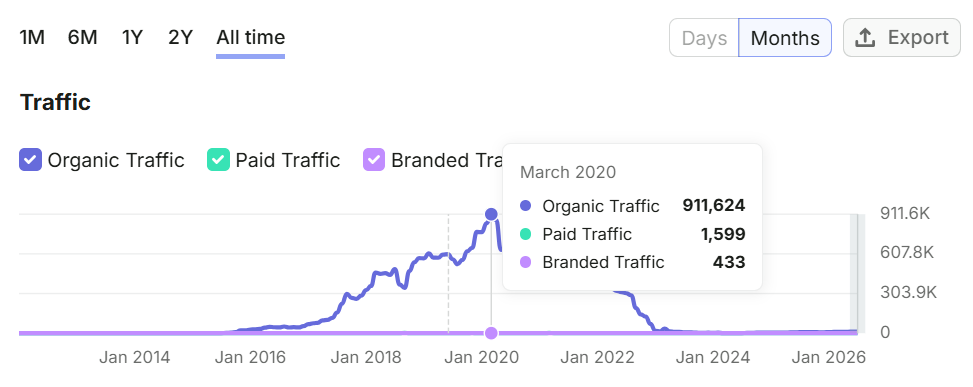
No tricks in there. Just answering questions better than the next site, at scale.
On-Page SEO Checklist
On-page SEO is everything you control on the page itself. It gives Google clear signals about what the page is and helps it rank — and it’s the fastest-moving lever for a new site, because you can fix it all in an afternoon. (High impact.)
Run this on every important page:
Title tag. Your most important on-page element. Put the main keyword near the front, keep it under about 60 characters so it doesn’t get cut off, and make it something a human wants to click. Titles matter enough that Google rewrites about a third of them when it thinks it can do better — so write a good one and don’t hand it the excuse.

Meta description. Doesn’t directly rank you, but a good one lifts click-through rate. Keep it under ~155 characters, describe what the page delivers, and include the keyword naturally.
One clear H1. One H1 per page, containing the topic, with a logical H2/H3 structure underneath. This is your page’s outline — for readers and for Google.
Clean URL slug. Short, hyphenated, readable. yoursite.co.nz/panel-beater-tauranga beats yoursite.co.nz/?p=4821.
Image alt text. Describe what each image shows, naturally. It helps accessibility and gives Google context.
Internal links. Link relevant pages to each other with descriptive anchor text. It spreads authority around your site and helps Google understand how your pages relate.
Add schema markup where it fits and you can lift click-through further — structured data has been linked to around a 30% CTR bump on eligible results. On-page is the highest effort-to-reward ratio on this whole list. Don’t skip it.
Technical SEO Checklist
Technical SEO makes sure Google can actually crawl, index, and trust your site. Think of it like checking under the hood — the car might still run with problems, but not well. (High impact for fixing what’s broken; medium for the polish.)
Pass Core Web Vitals. These are Google’s page-experience metrics — loading (LCP), responsiveness (INP), and visual stability (CLS). Run your site through PageSpeed Insights (free), and aim for the thresholds Google publishes: LCP under 2.5s, INP under 200ms, CLS under 0.1. On WordPress, most speed problems come from a bloated theme, huge unoptimised images, or too many plugins.

Be mobile-friendly. Google indexes the mobile version of your site first. If it’s a mess on a phone, you’re in trouble. Test it on an actual phone, not just a shrunk browser window.
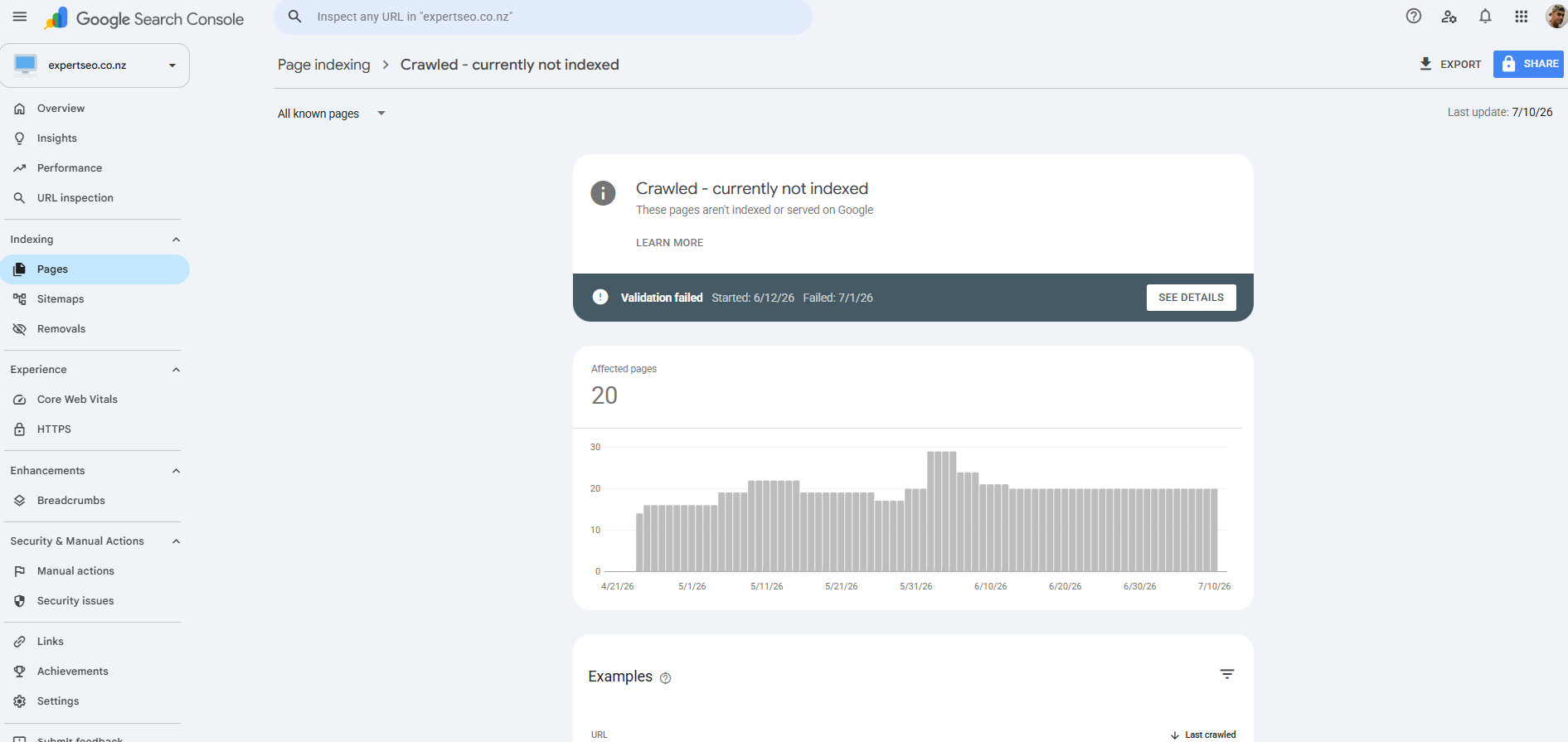
Check what’s indexed. In Search Console, open the Pages report. If important pages sit under “Crawled – currently not indexed,” Google’s seen them and chosen not to include them — usually a content-quality or duplication signal worth fixing.
Fix broken links and 404s. Dead internal links waste crawl budget and annoy users. A free crawler (Screaming Frog does up to 500 URLs free) will find them.
Add schema markup. Structured data helps Google — and AI — understand your content. For a local business, LocalBusiness schema is the one to add first. You can generate it with a free tool and validate it with Google’s Rich Results Test before it goes live.
Most NZ small-business sites I audit have a list of technical issues quietly holding them back. Fix the broken stuff first; save the fancy stuff for later.
Local SEO Checklist for NZ Businesses
If you serve a physical area, this section might be the most important one on the page. Local SEO is how you show up in the map pack for searches like “plumber Hamilton” or “café near me” — and for most local businesses, that’s where the actual leads are. (High impact if you’re local.)
Local intent is huge, and the map pack is prime real estate — the three-business local pack pulls a big share of local clicks. Here’s the checklist:
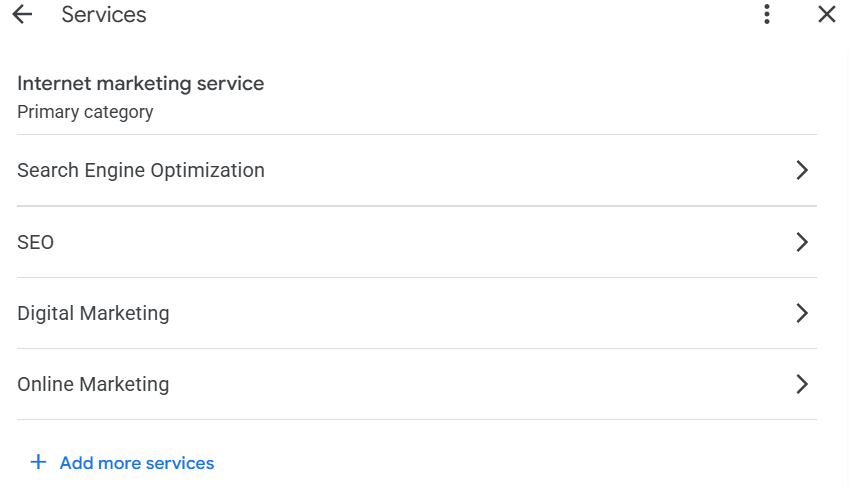
Set up and fully complete your Google Business Profile. Search “Google Business Profile,” create or claim your listing, and fill in everything — exact business name, address, phone, website, hours, and the right primary category. Category choice is a genuine ranking factor, so be precise: “Panel beater,” not “Auto shop.”
Get your NAP consistency right. Your Name, Address, and Phone number must match exactly everywhere they appear online — website, Facebook, directories. Even “Street” vs “St” inconsistencies chip away at trust.
Build local citations. Get listed in NZ directories — Yellow, Localist, NZS, Finda, your industry associations. Consistency matters more than volume; the top local businesses average dozens of citations, all matching.
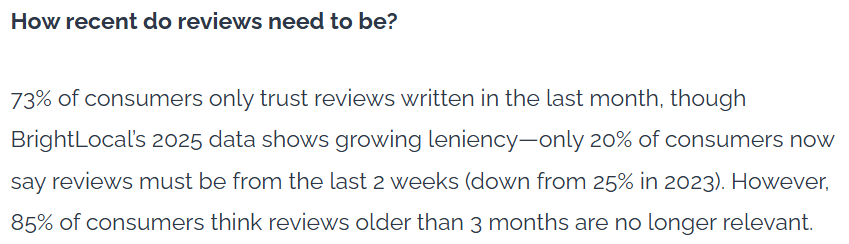
Build a review engine. Reviews are one of the strongest local signals, and recency counts — most people only trust reviews from the last few weeks. Grab your review link from your profile, turn it into a QR code for invoices and the van, and text it to happy customers right after a good job. Then reply to every review, good or bad.
Create location pages if you serve multiple areas — a real page for each, with genuinely local content, not the same page with the town name swapped. (This is exactly how our SEO in Hamilton and Auckland SEO pages are built.)
This is a moat competitors ignore. My own site ranks #1 in NZ for “local SEO” — above Ahrefs and Semrush — off the back of doing exactly this.

Link Building Checklist
Link building is getting other websites to link to yours. Each quality link is a vote of trust, and it’s still one of Google’s strongest ranking signals. But the checklist here is about quality and safety — because the wrong links actively hurt you. (High impact, but slow.)
Earn a few good links, not a hundred cheap ones. One link from a respected NZ industry site is worth more than a thousand from spammy directories. Quality over quantity, every time.
Start with the easy, legitimate wins:
- Local citations and directories (you did these in the local section — they count).
- Supplier, partner, and association pages — ask the businesses you already work with.
- Digital PR — a genuinely useful story, stat, or resource that NZ media or blogs want to link to.
- Guest posts on relevant industry sites — still one of the best sources when the site is real and relevant.
Answer the beginner question honestly: no, a link from your own Facebook or Instagram doesn’t count as a proper backlink (they’re “nofollow” and self-made). They’re fine for traffic, not for authority.
Build links at a natural pace. A brand-new site that suddenly gains 500 links looks bought. Steady beats spiky.

I’ve placed content that earned #1 rankings on industry sites pulling 60,000–300,000+ visits a month. The pattern was never volume. It was relevance and quality, built up over time.
The AI Search Checklist (ChatGPT & Google AI Overviews)
Ranking now means more than the blue links. AI Overviews sit at the top of Google for a huge share of searches, and people ask ChatGPT the questions they used to type into Google. Getting cited there is its own checklist — and barely any NZ businesses are doing it. (High impact and rising.)
First, the reality check. AI Overviews can cut clicks to the winning page by a third or more, and Google’s AI answers now reach well over 2 billion people a month. If you’re not in the answer, you’re invisible to a growing slice of searchers. The good news: the work that gets you cited is mostly the work you’re already doing.
Answer questions directly. Lead each section with a clean, one-or-two-sentence answer, then expand. AI lifts direct answers. This one habit does more for AI visibility than anything else.
Add schema markup. Structured data helps AI understand and trust your page — pages with schema get cited noticeably more often in ChatGPT-style answers.

Be genuinely authoritative. AI cites sources it trusts — the deep, first-hand, well-structured ones. The E-E-A-T you built in the content step is what earns the citation.
Get mentioned on sites AI reads. Reddit, industry publications, roundups. AI models lean on them heavily.
This isn’t theory for me. My own new site is already cited in Google’s AI Mode and named by ChatGPT, and that sleep site’s pages are still being quoted by AI tools years later. The exact thing that made them rank is what makes AI quote them now. Good SEO wins the AI shift — it doesn’t lose to it.
Ecommerce & Shopify Add-Ons
If you sell online, everything above still applies — but add these. Online stores have a few extra items the standard checklist misses. (High impact for stores.)
Optimise product pages. Write unique descriptions for every product — never paste the manufacturer’s copy, which lands you in duplicate-content territory. Include the keywords real buyers use, clear photos with alt text, and reviews on the page.
Don’t neglect collection/category pages. For ecommerce SEO, category pages (“men’s trail running shoes”) often have more search demand than any single product — and they’re frequently left as bare grids with no content. Add a few paragraphs of genuinely useful copy up top.
Handle the technical quirks. Platforms like Shopify auto-generate a lot of thin and duplicate pages (tag pages, filtered URLs). Keep them out of the index so they don’t dilute your good pages.
I built the SEO strategy for a Shark Tank–featured ecommerce brand — audited what was leaking, mapped the roadmap, and showed the growth before they spent a cent implementing.
What to Expect: Realistic SEO Timelines for NZ
Here’s the honest part nobody puts on their checklist. SEO is not instant, and knowing the real timeline is what stops you quitting right before it works. (Read this before you start.)
A rough map for a typical NZ business:
- Month 1–2: Setup and foundations. You’ll see almost nothing in rankings. This is normal and it is not a sign it’s failing.
- Month 3–4: Pages start appearing deeper in results and climbing. Impressions in Search Console tick up before clicks do — that’s your first real signal.
- Month 6: Solid traction. Real keywords on page one, real enquiries coming in.
- Month 12+: Compounding. This is where SEO pulls ahead of every other channel and keeps paying.
Why so slow? Google needs time to trust a site, and the pages that dominate are usually well-established — most top-ranking pages are over a couple of years old. Local SEO tends to move faster than national; competitive niches move slower.
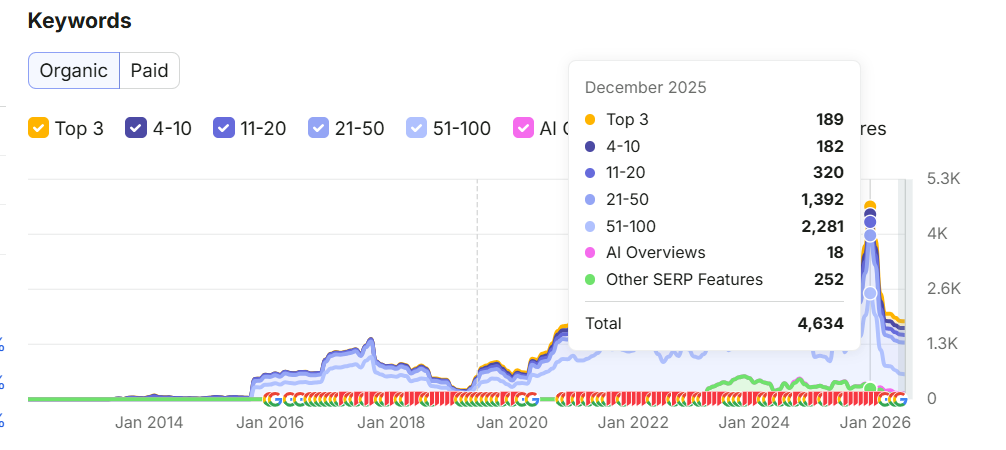
My own site’s arc is the honest example: months of quiet, then 233 keywords and steady traffic by month eight. HealthVI looked like nothing for a while, then went 0 to 20,000+ a month.

The first three months looking like nothing isn’t the process failing. It’s the process working before you can see it.
The SEO Mistakes That Undo the Whole Checklist
You can tick every box above and still go nowhere if you make one of these. Most of them cost real money. (Avoid these.)
- Buying cheap backlinks. The fastest way to tank a site. A hundred $5 links look bought because they are, and Google treats them accordingly.
- Keyword stuffing. Cramming the keyword in 40 times reads like spam to people and to Google. Write naturally.
- Chasing global volume over NZ intent. That “50,000 searches a month” keyword is worthless if the searchers aren’t in your market or aren’t buying.
- Fighting search intent. Publishing a sales page where Google wants a guide. You won’t rank, no matter how good the page is.
- Getting your Google Business Profile suspended. Keyword-stuffing your business name, using a fake address, or a virtual office can get you suspended — and getting reinstated is painful.
- Never measuring. If you’re not watching Search Console, you’re flying blind and can’t tell what’s working.
The theme runs through all six: shortcuts. If a tactic feels like it’s gaming Google rather than earning the ranking, it’ll cost you eventually. When something’s already gone wrong and you can’t tell what, a proper SEO audit is how you find it.

Final Thoughts
If I had to bet on why one NZ business outranks another, it wouldn’t be budget or tools. It’d be that one of them picked the five things that matter and did them consistently, while the other kept starting new tactics and abandoning them.
The businesses that win at SEO aren’t doing more than you. They’re doing less, better, for longer. A checklist with five things you actually finish beats a checklist with two hundred you never start.
So don’t try to do all of this at once. Do the top five. Give it three months without panicking. Then come back and work down the list. That’s the whole secret — and it’s a lot more boring, and a lot more reliable, than the internet makes it sound.
SEO Checklist: FAQ
What is an SEO checklist?
An SEO checklist is a prioritised list of the tasks that help a website rank higher on Google — covering setup, keyword research, content, on-page, technical, local, and link building. It exists so you do the right things in the right order instead of guessing.
What are the 4 types of SEO?
On-page SEO (what's on your page), technical SEO (how your site is built and crawled), content (the pages themselves matching search demand), and off-page SEO (mainly backlinks from other sites). Local SEO is a fifth layer for businesses that serve a physical area.
What are the 5 components of SEO?
Most people break it into keyword research, on-page SEO, content, technical SEO, and off-page SEO (links). Nail those five and you've covered the vast majority of what moves rankings.
How do I do my own SEO?
Work through this checklist in order: set up Search Console, do keyword research, write useful content, fix your on-page basics, sort your technical foundations, set up local SEO if you're a local business, and build a few quality links. Start with the top five high-impact items.
What are the best free SEO tools?
Google Search Console, Google Analytics 4, Google Keyword Planner, Bing Webmaster Tools, and PageSpeed Insights will cover almost everything on this checklist for free. Paid tools like Ahrefs or Semrush speed things up but aren't required to rank.
Can ChatGPT do an SEO audit?
Partly. ChatGPT can review content, suggest keywords, and spot obvious on-page issues, but it can't crawl your live site, read your Search Console data, or verify technical problems on its own. Use it alongside real tools, not instead of them.
How long does SEO take to work in New Zealand?
Expect little visible movement for the first two months, early traction around month three to four, and solid results by month six. Local SEO usually moves faster than national, and competitive niches take longer.